Bulk Edits
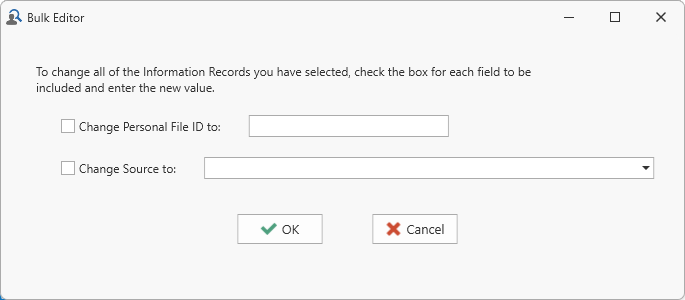 Bulk edits is a special feature for making the same change to multiple records (those currently selected) in a single operation. It only applies the Source
 A Source record in Clooz should be viewed as the higher-level component of one or more source citations. Source citation details are usually included in the citing Information Record., Information, and Subject Subjects are the objects you are gathering information about such as people, buildings, ships, etc. In most cases within Clooz, the Subject will be a person. However, Clooz supports several other Subject types such as businesses, real estate/buildings, ships and artifacts. pages.
First select all the records to be affected from the main screen, and then right-click to view the Context Menu The menu window that often appears when you right-click an area on the screen.. Select Bulk-Edit Items to display the Bulk Edit dialog to the particular data type you are working with.
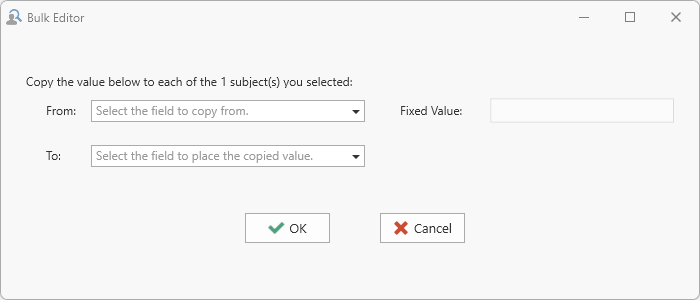 The bulk edit feature for Subject records These are records within the Clooz database representing the Subjects being researched, and contain summary information about the Subject such as the dates for birth, marriage, and death for people. can be used to set the values in one of the 3 user definable fields (Alternate ID, User Field 1, and User Field 2) to either the same fixed value for all records (as entered into the text box), or to values from other ID type fields in each record, including the various IDs from records linked to an external file which is currently designated as Primary in the external files list.
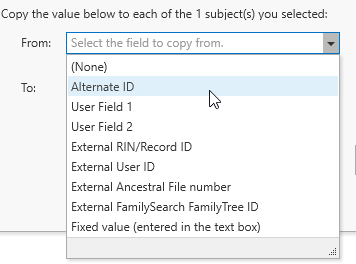 Select the desired source field (or use of fixed value) using the 'From' drop down list, and the destination field using the 'To' drop down list.
Use the Choose Columns context menu item on the main screen to turn on display of fields you want to view.
Here are the fields available to edit using this feature: